
How to Verify Whether a PDF Document Has Been AI-Generated
AI-generated content is becoming increasingly common, making it harder to determine whether a PDF document was written by a person, an AI tool, or a combination of both.
Whether you’re reviewing an academic paper, business report, or online submission, there are a few ways to assess whether AI may have been involved in its creation. Along with manually reviewing the content for common AI-writing patterns, you can use tools like Quillbot’s AI Detector to analyze the text and gain additional insights into its likely origin.
Table of contents
Why verify if a PDF Is AI-generated?
AI-generated content isn’t inherently problematic. In fact, many professionals use AI responsibly to brainstorm ideas, improve productivity, and streamline workflows.
However, there are situations where verifying content origin matters:
- Publishers reviewing article contributions
- Academic institutions checking student submissions
- Businesses assessing reports and proposals
- Recruiters evaluating writing samples
- Organizations enforcing content transparency policies
Understanding whether AI played a role in content creation can provide valuable context during the review process.
Common signs a PDF may be AI-generated
While AI-generated content can be highly sophisticated, certain patterns may stand out:
1. Repetitive language and structure
AI often relies on predictable sentence patterns and repeated phrasing.
While grammatically correct, the repetition can feel mechanical.
2. Generic or surface-level information
AI-generated text may explain topics clearly but lack original insights, detailed examples, or unique perspectives.
Human-written: “After I started taking a 30-minute walk every morning, I noticed I had more energy during work meetings and slept better at night. Over time, it also helped me manage stress more effectively.”
The first example provides general information that could apply to almost anyone, while the second includes a specific experience and personal insight, making it feel more authentic and distinctive.
3. Consistently formal tone
Many AI tools maintain the same tone throughout a document. Human writing often includes natural variations in style, emphasis, and expression.
How to verify a PDF using Quillbot’s AI Detector
One of the simplest ways to analyze a PDF document is by using Quillbot’s AI Detector.
The tool is designed to identify text patterns commonly associated with AI-generated writing and provide an assessment of the content.
Step 1: Extract the text from the PDF
Open the PDF and copy the text you want to analyze.
If the document contains scanned pages, use OCR (Optical Character Recognition) software to convert images into selectable text.
Step 2: Open Quillbot’s AI Detector
Navigate to Quillbot’s AI Detector and paste the extracted content into the analysis box.
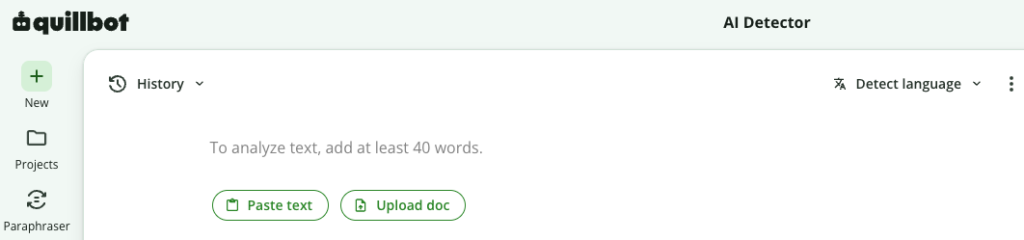
Step 3: Run the detection scan
The detector analyzes the text and evaluates patterns that may indicate AI-generated writing.
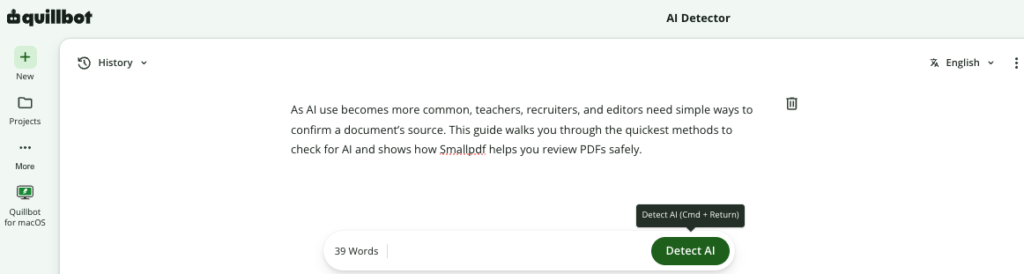
Step 4: Review the Results
The tool provides insights into whether the content is more likely to be:
- Human-written
- AI-generated
- AI-assisted
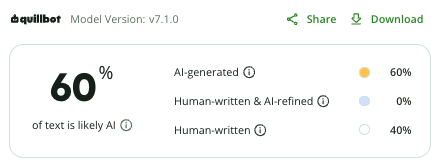
Use the findings alongside your evaluation for a well-rounded assessment.
The writing is
- Grammatically flawless
- Highly structured
- Consistently formal
- Lacking specific interpretations
Rather than relying on assumptions, the professor copies sections of the document into Quillbot’s AI Detector.
The results suggest significant AI involvement. The professor can then conduct a more profound review, compare the work with previous submissions, and follow institutional guidelines before making any decisions.
This approach combines technology with human oversight for a more responsible evaluation process.
Accuracy of AI detection tools
AI detectors can provide useful insights, but they cannot definitively prove whether content was written by AI or a human. Heavily edited AI text, mixed-authorship content, and certain writing styles can affect results.
For the best outcome, use AI detection tools alongside manual review and contextual evaluation.
Best practices for identifying AI-generated PDFs
As AI-generated content becomes more prevalent, identifying whether a PDF document is AI-written requires a balanced approach.
Looking for common AI-writing patterns and using tools such as Quillbot’s AI Detector can help you make more informed assessments while avoiding premature conclusions.
Frequently asked questions about detecting AI-generated PDFs
- Can a PDF itself reveal whether it was AI-generated?
-
A PDF itself cannot reveal whether it was AI-generated. Most PDF files don’t contain information that directly identifies whether the content was written by AI.
To assess authorship, you’ll need to analyze the text itself for common AI-writing patterns or use a tool such as Quillbot’s AI Detector to evaluate the content.
- How can I check if a PDF document was written using AI?
-
One of the easiest methods to check if a PDF document was written by AI is to copy the text from the PDF and analyze it with an AI detection tool.
Quillbot’s AI Detector can help identify patterns commonly associated with AI-generated writing, providing additional insights as well as manual review.
- What are the most common signs of AI-generated writing?
-
Common indicators of AI-generated writing include repetitive sentence structures, generic explanations, overly consistent tone, and a lack of original insights or personal experiences.
If you’re working with AI-generated content, learning how to add a more natural voice, varied sentence patterns, and personal touches can help. For practical tips, see Quillbot’s article, How to Make AI Writing Sound More Human.
- Can AI-generated PDFs be edited to appear human-written?
-
AI-generated content can be revised, paraphrased, or combined with human input, making it more difficult to identify through manual review alone. In such cases, it’s helpful to use multiple verification methods.
For example, you can analyze the text with Quillbot’s AI Detector to assess potential AI involvement and use Quillbot’s Plagiarism Checker to identify any content that may closely match existing online sources. Together, these tools can provide a more comprehensive evaluation of a document’s authorship.
Other interesting articles
If you want to know more about colors, letters, or the meaning of emojis, make sure to check out some of our other articles with explanations and examples.